Avatarize Yourself
 Pieter posted in "Profile pictures". 16 years, 8 months ago

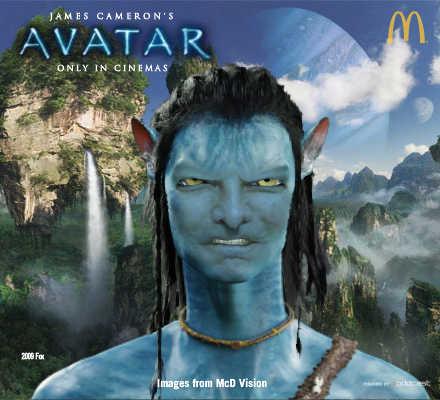
Seen Avatar, the James Cameron movie? Can't wait to become an avatar yourself and look like one of the blue-skinned, green-eyed humanoid species of the Na'vi tribe living on Pandora? Then here's your chance. The official Avatarize Yourself generator allows you to upload your picture and get Avatarized for free. You can also choose between different Pandora-staged backgrounds, and even change your gender (yikes!).
UPDATE: The generator below has become buggy and often stops processing at 64% or 80%. You might want to try the alternative "Become an Avatar" tool.
Feel free to tell your friends how to become a Na'vi with the generator below by sharing our Avatarize Yourself post on Facebook (click the blue F share button under the title of this post)!
How to Avatarize Yourself:
- Click the "Skip" button and then the "Upload Photo" button.
- Click "Upload My Photo".
- Tick the "Agree to terms of use" box.
- Hit the "Browse for Photo" button and find a JPG/JPEG/GIF or PNG picture of your head, eyes opened, facing forward, not smiling, without a hat, hair or shadows over your face. Open it.
- Now adjust your photo to resemble the sample photo (zoom, rotate and move) and hit "Submit".
- In the next step, position the colored points around your head (eyes,  nose, ears and mouth) to match the sample photo and press  "Submit" again.
- Wait for half a minute and then enjoy (and customize) your resulting Avatar.
Here are the instructions to follow if you want to use your avatar as your Facebook profile picture:
- After succesfully creating your Na'vi self with the generator above, click the Share button.
- Then select the "Download as image" option. Click Ok on the next screen, and save the image file to your computer.
- Now go to your Facebook profile, click the upload the pencil button that appears on the top right of your current profile picture.
- Choose upload a picture and select the Avatarized picture you just saved locally.
- Voilà . You now look like a blue Na'vi on Facebook!
 UPDATE: We've found another free Avatar-ize Yourself generator which creates small icons (69 by 73 px) based on your photo upload. They're not as detailed as the McDonald's version and the generator doesn't always seem to work, but seeing there are a lot of Avatar fans visiting this page we thought we'd add the link and an example.
» Use the alternative Avatarize Yourself generator (NOTE: We recommend the widget posted above for the best results).
Finally, here's our Avatarized mascot. Could perfectly play the badass in the movie, right?